AdnRelax is a Houdini SOP designed to smooth creases and correct over-compression or over-stretching on geometry surfaces. This deformer can help refining different types of meshes, like the fascia and skin resulting from the simulation by computing an iterative algorithm that combines smoothing, relaxation, and volume corrections. The AdnRelax SOP applies smoothing and relaxation in each iteration, while the volume correction (i.e. a push in and push out adjustment in the direction of the point normals) is applied during the final iteration.
The AdnRelax SOP is easy to create and configure in Houdini. It only requires the mesh to apply the relaxation onto. Typically, this mesh would be the simulated fascia or skin.
Go to the geometry context of the rig containing the geometry to apply the deformer to.
Press TAB and navigate to the submenu Adonis > Deformers to find the AdnRelax SOP type.
Create it and connect the geometry to the input.
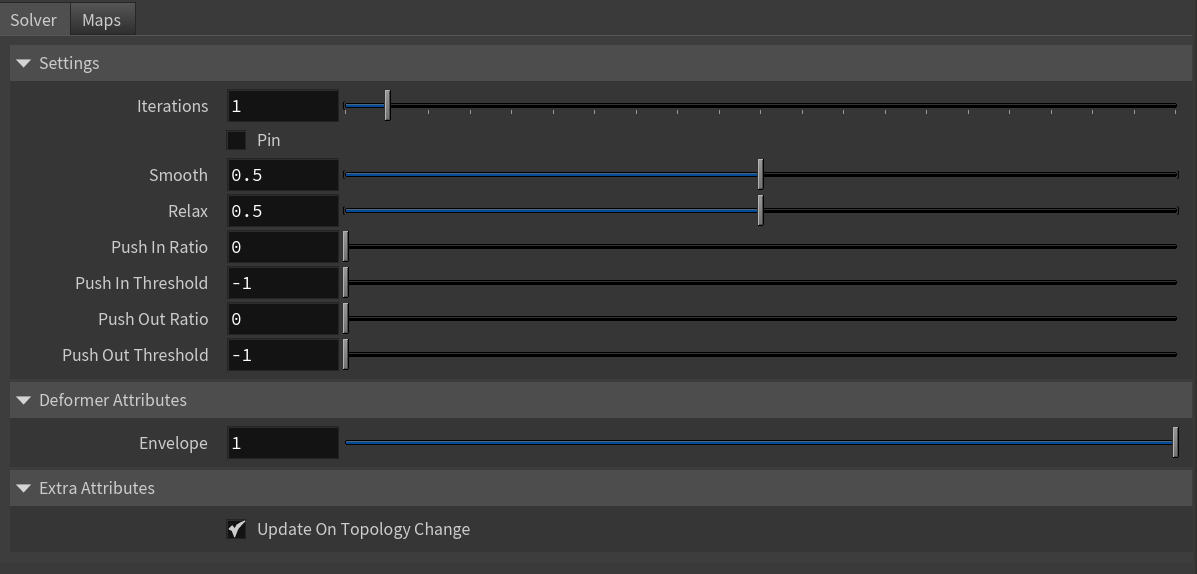
Increase the number of iterations to see the effect of the deformation. Check the Attributes section to customize their configuration.
Number of iterations of the relaxation algorithm. Greater values mean greater computational cost. Has a range of [1, 10]. The upper limit is soft, higher values can be used.
Pin
Boolean
False
✓
Flag to pin the vertices on the boundaries.
Smooth
Float
0.5
✓
Amount of smoothing to apply. Has a range of [0.0, 1.0].
Relax
Float
0.5
✓
Amount of relaxation to apply. Has a range of [0.0, 1.0].
Push In Ratio
Float
0.0
✓
Amount of correction applied by the push in adjustment. Has a range of [0.0, 2.0]. The upper limit is soft, higher values can be used.
Push In Threshold
Float
-1.0
✓
Maximum correction applied by the push in adjustment. The threshold will be ignored if its value is 0.0 or less. Has a range of [-1.0, 2.0]. The upper limit is soft, higher values can be used.
Push Out Ratio
Float
0.0
✓
Amount of correction applied by the push out adjustment. Has a range of [0.0, 2.0]. The upper limit is soft, higher values can be used.
Push Out Threshold
Float
-1.0
✓
Maximum correction applied by the push out adjustment. The threshold will be ignored if its value is 0.0 or less. Has a range of [-1.0, 2.0]. The upper limit is soft, higher values can be used.
Toggles the update of the internal geometry connectivity data only when the topology of the input mesh changes. If enabled, the SOP runs faster by reusing that information at each frame. If disabled, the SOP runs slower because that information needs to be recomputed at each frame.
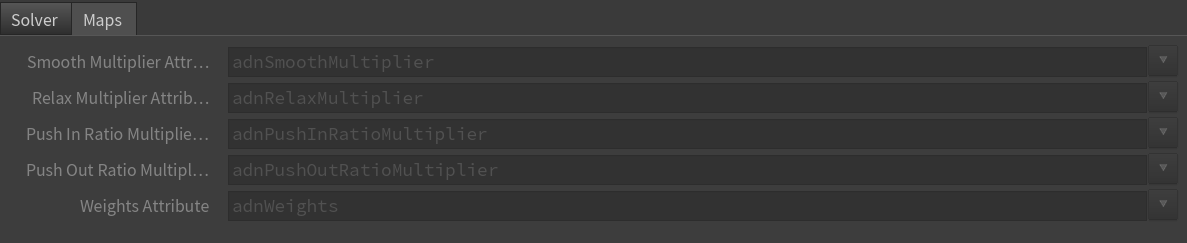
Specifies the name of the per-point attribute to read the multiplier of the smoothing. The expected attribute name is adnSmoothMultiplier. The expected range of the per-point values is [0.0, 1.0].
Relax Multiplier Attribute
float
1.0
✗
Specifies the name of the per-point attribute to read the multiplier of the relaxation. The expected attribute name is adnRelaxMultiplier. The expected range of the per-point values is [0.0, 1.0].
Push In Ratio Multiplier Attribute
float
1.0
✗
Specifies the name of the per-point attribute to read the multiplier of the push in ratio. The expected attribute name is adnPushInRatioMultiplier. The expected range of the per-point values is [0.0, 1.0].
Push Out Ratio Multiplier Attribute
float
1.0
✗
Specifies the name of the per-point attribute to read the multiplier of the push out ratio. The expected attribute name is adnPushOutRatioMultiplier. The expected range of the per-point values is [0.0, 1.0].
Weights Attribute
float
1.0
✗
Specifies the name of the per-point attribute to read the weight of the deformation. The expected attribute name is adnWeights. The expected range of the per-component per-point values is [0.0, 1.0].
NOTE
All maps parameters are disabled in the Maps tab because the attribute names are fixed to drive specific functionalities of the solver.
Fixed point attribute names also ensure compatibility with the API.
To copy the map names of the disabled attributes for painting (using an attribute paint node) right click on the disabled map attribute parameter, press "Copy Parameter", select the attribute paint node and on the attribute name entry right click and press "Paste Values". This allows to easily copy the attribute name for painting.
The Make Paintable utility provided in the Adonis menu > Utils, can be used to create the attribpaint node and automatically populate the entries with the map names of the AdnRelax SOP.
If a point attribute on the geostream does not match the naming convention exposed in the node, use an "Attribute Rename" node to rename the attribute to match the expected naming convention.
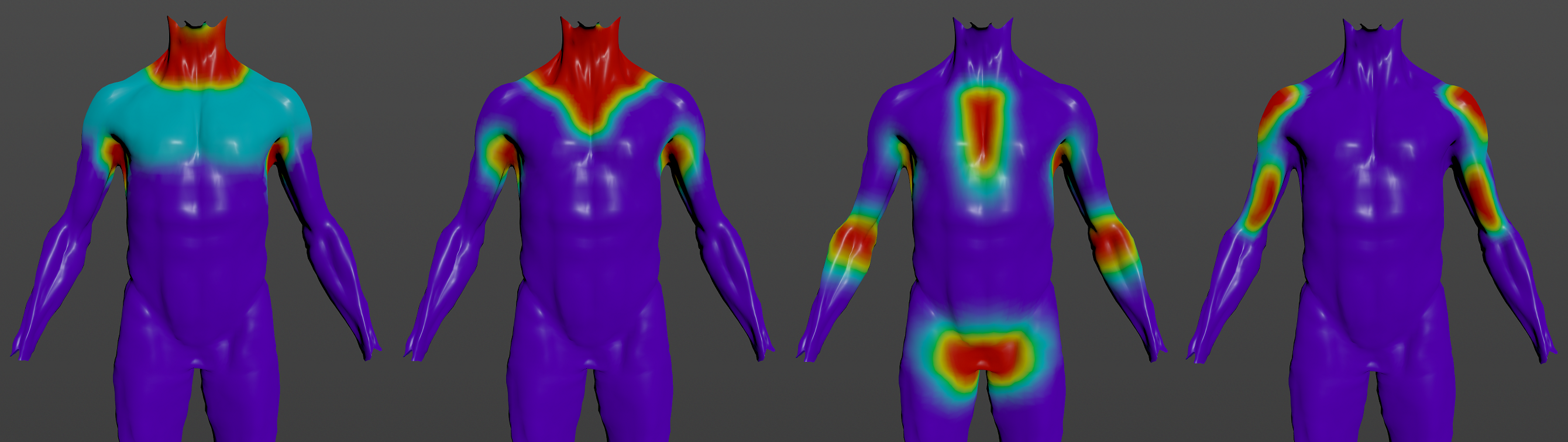
To provide more control, some key parameters of the AdnRelax SOP are exposed as paintable attributes.
Name
Default
Description
Push In Ratio Multiplier
1.0
Weight to multiply the push in adjustment applied to the geometry surface.
Push Out Ratio Multiplier
1.0
Weight to multiply the push out adjustment applied to the geometry surface.
Smooth Multiplier
1.0
Weight to multiply the smoothing applied to the geometry surface.
Relax Multiplier
1.0
Weight to multiply the relaxation applied to the geometry surface.
Weights
1.0
Global weights map used to control the influence of the deformer at each vertex.
Figure 3: Example of paintable weights of AdnRelax SOP applied to the fascia layer of a biped. From left to right: smooth multiplier, relax multiplier, push in ratio multiplier, push out ratio multiplier.
NOTE
To tweak the point attributes of an AdnRelax SOP, an attribpaint is needed. To ease the creation and initial configuration of this node, select the AdnRelax SOP and click on Adonis > Utils > Make Paintable. This utility will create an attribcreate node to define the required point attributes and assign their default values followed by an attribpaint node to allow these attributes to be modified. Both nodes are automatically named and properly connected to the AdnRelax node.


 SOP type.