

AdnTransfer
The AdnTransfer script is a Python Script designed to automate the transfer of anatomy layers after the primary anatomy transfer has been completed using AdnRadialWrap.
In the anatomy transfer workflow, AdnRadialWrap is first used to reshape and repose the skin and mummy geometries. Once these geometries have been transferred, the AdnTransfer propagates the resulting deformation to the remaining anatomy layers by automatically creating and configuring the required AdnSoftWrap and AdnRigidWrap deformers.
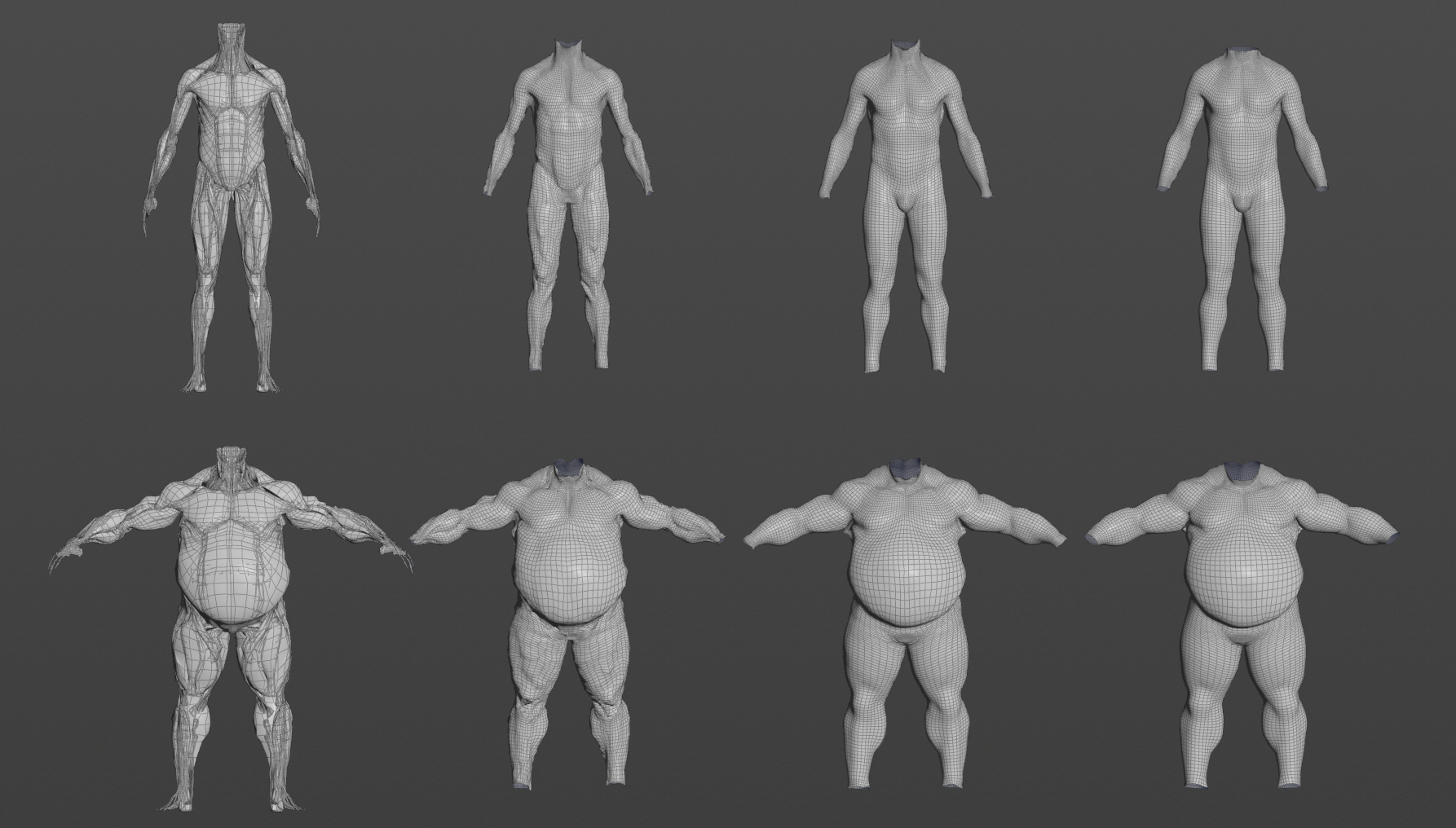
This allows the complete anatomy hierarchy to be transferred from one character to another while preserving the spatial relationships between the different anatomical layers.
After completing the anatomy transfer workflow, an existing Adonis simulation rig created for the source character can also be reused and imported on the transferred anatomy. This allows simulation setups authored for a template character to be adapted to new characters after the anatomy transfer process.
The main function to run AdnTransfer is apply_transfer, which is defined as follows:
from adn.scripts.maya.transfer import apply_transfer

def apply_transfer(
    morphed_skin,             # str: morphed skin geometry (e.g. the result of AdnRadialWrap)
    morphed_mummy,            # str: morphed mummy geometry (e.g. the result of AdnRadialWrap)
    sim_skin,                 # str: name of the skin cut to be transferred.
    fat,                      # str: name of the fat geometry to be transferred.
    muscles,                  # str or list: name of the muscle geometries to be transferred.
    fascia,                   # str: name of the fascia geometry to be transferred.
    radius=None,              # float: radius value for the AdnSoftWrap nodes created.
    max_points=False,         # int: number of maximum points for the AdnSoftWrap nodes created.
    force=False,              # bool: whether to force the transfer process even if existing deformers are present.
    piece_attrib_name="path", # str: name of the primitive attribute used to separate the muscles
    report_data=None          # dict: collects errors and warnings
)
Requirements
To use the AdnTransfer script, the following inputs must be provided:
- morphed_skin: skin geometry already deformed using AdnRadialWrap.
- morphed_mummy: mummy geometry already deformed using AdnRadialWrap.
- sim_skin: skin cut geometry to be transferred.
- fat: fat geometry to be transferred.
- muscles: one or more muscle geometries to be transferred.
- fascia: fascia geometry to be transferred.
The following parameters are also available:
- radius: Search radius used by the generated AdnSoftWrap deformers.
- max_points: Maximum number of neighboring points considered by the generated AdnSoftWrap deformers.
- The morphed_skin and morphed_mummy geometries are expected to already contain the desired anatomy transfer deformation, typically generated using AdnRadialWrap. Refer to the AdnRadialWrap page for more information.
- Additionally, the AdnRigidWrap and AdnSoftWrap deformers created by AdnTransfer require their target geometries to be in their rest pose during initialization. To achieve this, we recommend setting two keyframes on the envelope attribute of both AdnRadialWrap deformers: a value of
0on the initialization frame and a value of1on the following frame. This allows the generated AdnRigidWrap and AdnSoftWrap deformers to initialize using the non-deformed target geometries and subsequently transfer the deformation once the AdnRadialWrap deformers become active.- The paths to SOP nodes must be absolute.
- If muscles are provided as a combined mesh, the geostream must contain a primitive attribute, passed to
apply_transfervia thepiece_attrib_nameargument, to allow AdnTransfer to identify each individual geometry piece.
Arguments
In this section we provide a brief overview of the arguments of the apply_transfer function.
| Argument | Required | Type | Default | Description |
|---|---|---|---|---|
| morphed_skin | Yes | string | Path to the node that contains the skin mesh already deformed using AdnRadialWrap. | |
| morphed_mummy | Yes | string | Path to the node that contains the mummy mesh already deformed using AdnRadialWrap. | |
| sim_skin | Yes | string | Path to the node that contains the skin cut mesh to be transferred. | |
| fat | Yes | string | Path to the node that contains the fat mesh to be transferred. | |
| muscles | Yes | string or list | Muscle meshes to be transferred. It can be: 1) path to the node containing the geometry of all the muscles; 2) list of paths to the nodes containing each isolated muscle geometry. | |
| fascia | Yes | string | Path to the node that contains the fascia mesh to be transferred. | |
| radius | Optional | float | None | Radius attribute that will be set to the AdnSoftWrap deformers created. |
| max_points | Optional | integer | None | Maximum points attribute that will be set to the AdnSoftWrap deformers created. |
| piece_attrib_name | Optional | string | path |
String defining the name of the primitive attribute that will be used to identify each muscle geometry. |
| report_data | Optional | dictionary | None | A dictionary ({"errors": [], "warnings": []}) to capture any issues during execution. |
How To Use
-
Open a scene containing all the geometries to be provided to AdnTransfer.
-
Create the arguments for the
apply_transferfunction.
morphed_skin = "/obj/geo1/skin_GEOShape"
morphed_mummy = "/obj/geo1/mummy_GEOShape"
sim_skin = "/obj/geo1/simSkin_GEOShape"
fat = "/obj/geo1/fat_GEOShape"
muscles = "/obj/geo1/muscles_GRP"
fascia = "/obj/geo1/fascia_GEOShape"
radius = 7.0
max_points = 20
report_data = {"errors": [], "warnings": []}
- Run the following command in a Python Source Editor or Python Shell window by providing the previous arguments.
from adn.scripts.maya.transfer import apply_transfer
apply_transfer(
    morphed_skin,
    morphed_mummy,
    sim_skin,
    fat,
    muscles,
    fascia,
    radius=radius,
    max_points=max_points,
    report_data=report_data
)
- If something goes wrong during the execution, error and warning messages will be added to the
report_datadictionary. Execute the following code to log all the information in the terminal for troubleshooting.
import logging
for err in report_data["errors"]:
    logging.error(err)
for warn in report_data["warnings"]:
    logging.warning(warn)
The script automatically creates and configures the required AdnSoftWrap and AdnRigidWrap deformers to propagate the deformation through the anatomy hierarchy.
If the Radius value used by the generated AdnSoftWrap deformers is too small, some points may fail to find any valid neighbor points within the search area. In such cases, no deformation will be transferred to those points. Make sure the radius is large enough relative to the character dimensions to guarantee that all points can find suitable neighbors.
- Note that the whole AdnTransfer can be undone.
- AdnTransfer can also be executed with the AdnTransfer Tool. For more details, please refer to the AdnTransfer Tool page.
Result
As a result of executing the script, the following nodes will be created:
- An AdnRigidWrap applied to the Skin Cut geometry using the Morphed Skin as target.
- An AdnSoftWrap applied to the Fat geometry using the transferred Skin Cut as target.
- An AdnSoftWrap applied to each muscle geometry using both the transferred Fat and the Morphed Mummy as targets.
- An AdnRigidWrap applied to the Fascia geometry using all transferred muscles as targets.
Once all deformers have been created, the deformation is propagated from the Morphed Skin and Morphed Mummy through all anatomy layers, completing the anatomy transfer workflow.
Limitations
- All anatomy layers must be provided. The script does not support transferring only a subset of the required geometries.


