

AdnSoftWrap
AdnSoftWrap is a Maya deformer that transfers deformations from one or more target geometries to an input geometry using a proximity-based influence model.
For every point of the deformed geometry, the deformer searches for nearby points belonging to the connected target geometries. All target points found within a user-defined radius are considered as potential influences, up to a maximum number of neighboring points. The resulting deformation is then computed from the contribution of those neighboring target points and applied to the affected point.
This deformer is particularly useful for transferring complex deformations between unrelated meshes, driving secondary geometry, or creating flexible deformation setups without requiring topological correspondence. It is also a core component of the AdnTransfer Tool, enabling the transfer of muscle and fat anatomy between character models.
How To Use
The AdnSoftWrap is easy to create and configure in Maya. It requires the mesh to apply the deformation onto and the target(s) that will drive the deformation.
- Select targets and then the mesh on which to apply the deformer.
- Press Soft Wrap
 in the Adonis menu, under the Create Deformers section.
 - A message in the terminal will notify that AdnSoftWrap has been created properly. Check the Attributes section to customize their configuration.
Attributes
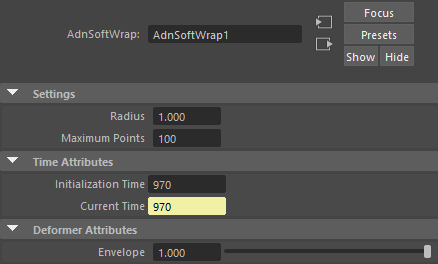
Settings
| Name | Type | Default | Animatable | Description |
|---|---|---|---|---|
| Radius | Float | 1.0 | ✗ | Defines the maximum distance used to search for influencing target points. Only target points located within this radius can contribute to the deformation of a given point. Larger values increase the area of influence and produce smoother results at the cost of performance. The minimum value allowed is 0.0. |
| Maximum Points | Integer | 100 | ✗ | Defines the maximum number of neighboring target points that can influence a point of the deformed geometry. Larger values will produce smoother results at the cost of performance. Has a range of [1, 10]. The upper limit is soft, higher values can be used. The minimum value allowed is 0. |
Time Attributes
| Name | Type | Default | Animatable | Description |
|---|---|---|---|---|
| Initialization Time | Time | Current frame | ✗ | Sets the frame at which the deformer will be initialized. |
| Current Time | Time | Current frame | ✓ | Current playback frame. |
Deformer Attributes
| Name | Type | Default | Animatable | Description |
|---|---|---|---|---|
| Envelope | Float | 1.0 | ✓ | Specifies the deformation scale factor. Has a range of [0.0, 1.0]. The upper and lower limits are soft, values can be set in a range of [-2.0, 2.0] |
Attribute Editor Template
Paintable Weights
The Maya paint tool must be used to paint the Weights map to ensure that the values satisfy the deformation needs.
| Name | Default | Description |
|---|---|---|
| Weights | 1.0 | Maya standard weights map used to control the influence of the deformer at each vertex. |


