

AdnRadialWrap
AdnRadialWrap is a Maya deformer that reshapes and reposes an input geometry using pairs of corresponding landmarks.
The deformation is driven by two sets of landmarks: input landmarks, positioned on the input geometry, and goal landmarks, positioned on one or more goal geometries. Each input landmark must relate to a goal landmark describing its desired location on the goal geometry. By establishing these correspondences, AdnRadialWrap computes a smooth deformation that transforms the input geometry toward the shape defined by the goal landmarks.
The goal geometries themselves are primarily used as references for landmark placement in the Landmark Tool and for the refinement process in the AdnRadialWrap deformer.
Once the landmark pairs have been defined, the deformer can compute the main reshaping and repose deformation without requiring the goal geometries themselves. Optionally, one or more goal geometries can be used to further refine the result by progressively adjusting and fitting the geometry to the goal surfaces, helping produce smoother and more accurate results while preserving the overall shape defined by the landmarks.
AdnRadialWrap does not require topological match between the input and goal geometries because the correspondence is actually described by the pairs of landmarks. This makes it particularly useful for character reshaping, anatomy transfer, pose transfer, and fitting operations between related but structurally different meshes.
Landmarks are represented using AdnPointLocator. These are specialized Adonis nodes designed specifically to define landmark positions and should be used instead of regular Maya transforms or locators. The recommended workflow for creating landmarks, placing them, and creating the deformer is through the Landmark Tool, which automates and simplifies the setup process.
How To Use
There are two ways to create and configure an AdnRadialWrap deformer.
Using the Landmark Tool
The recommended workflow is to use the Landmark Tool, which simplifies the creation and management of landmark pairs as well as the setup of the AdnRadialWrap deformer.
- Press Landmark Tool in the Adonis menu, under the Tools section.
- Provide the input and goal geometries.
- Provide the input and goal wildcard patterns.
- Press Add Landmark Pair to add a new empty pair of landmarks.
- Press the button corresponding to the input landmark to create an AdnPointLocator, then position it as desired.
- Press the button corresponding to the goal landmark to create an AdnPointLocator, then position it as desired.
- Repeat steps 4 to 6 for as many landmarks as needed.
- Press Apply to create a new AdnRadialWrap and automatically connect the defined landmarks.
The Landmark Tool currently supports a single goal geometry, which simplifies landmark placement and correspondence management.
Using the Adonis Menu
AdnRadialWrap can also be created directly from the Adonis menu.
- Select the goal meshes and then the mesh on which to apply the deformer.
- Press Radial Wrap
 in the Adonis menu, under the Create Deformers section.
 - A message in the terminal will notify that AdnRadialWrap has been created properly. Check the Attributes section to customize its configuration.
When created from the menu, the deformer is initialized without any landmark pairs. The Landmark Tool must then be used to create and connect the required landmark pairs.
This workflow is recommended when working with multiple goal geometries, as AdnRadialWrap supports multiple goals while the Landmark Tool is designed around a single goal geometry workflow. When defining landmarks in this setup, the Landmark Tool allows one of the connected goal geometries to be provided as a reference surface for goal landmark placement.
- AdnRadialWrap requires at least four pairs of corresponding landmarks to produce a deformation.
- The number of input and goal landmarks must be the same.
- For more information about the Landmark Tool, refer to this page.
Attributes
Refinement
| Name | Type | Default | Animatable | Description |
|---|---|---|---|---|
| Refinement Iterations | Integer | 1 | ✓ | Number of iterations for the refinement process. Higher values may produce a better quality result at the cost of performance. Has a range of [1, 20]. The upper limit is soft, higher values can be used. |
| Relax Iterations | Integer | 1 | ✓ | Number of relaxation iterations performed for each refinement iteration. Has a range of [1, 20]. The upper limit is soft, higher values can be used. |
| Closest Point Adjustment | Boolean | True | ✓ | Toggles the closest point adjustment performed at the end of each refinement iteration. |
Time Attributes
| Name | Type | Default | Animatable | Description |
|---|---|---|---|---|
| Initialization Time | Time | Current frame | ✗ | Sets the frame at which the deformer will be initialized. |
| Current Time | Time | Current frame | ✓ | Current playback frame. |
Deformer Attributes
| Name | Type | Default | Animatable | Description |
|---|---|---|---|---|
| Envelope | Float | 1.0 | ✓ | Specifies the deformation scale factor. Has a range of [0.0, 1.0]. The upper and lower limits are soft, values can be set in a range of [-2.0, 2.0]. |
Attribute Editor Template
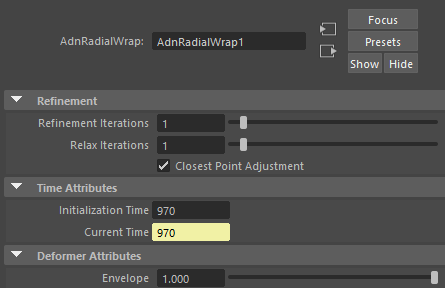
Paintable Weights
The Maya paint tool must be used to paint the Weights map to ensure that the values satisfy the deformation needs.
| Name | Default | Description |
|---|---|---|
| Weights | 1.0 | Maya standard weights map used to control the influence of the deformer at each vertex. |


