

Maya Python API
Experimental Python API
This API is experimental and may change in future versions of Adonis.
The use of this API in production applications is not supported.
An experimental Python API is available for Technical Directors who need to implement custom Python scripts for exporting and rebuilding Adonis rigs programmatically.
This API enables users to:
- Extract the setup from an existing Adonis rig in Maya.
- Rebuild the rig in another Maya scene.
- Export rig data in a format that can be imported into other DCCs, such as Houdini.
- Build an entire Adonis rig programmatically.
As this API is still under active development, please send feedback and feature requests to [email protected]. The support and development teams will work together to incorporate user feedback and refine the implementation.
The API can be found in:
Adonis/python/adn/api/adnx.py
The definitions can be imported with:
from adn.api.adnx import *
The API exposes Adonis rig entities through Python classes and type identifiers. The available classes, supported data entries, and implementation details are defined directly in adnx.py.
Requirements
Before using the Maya Python API, the Maya scene must contain a valid Adonis rig structure.
No context needs to be defined in the current version of the Maya API. The API uses the Maya scene directly when extracting, rebuilding, updating, or clearing Adonis rig components.
The rig data should follow the expected cross-DCC naming conventions when it needs to be transferred between Maya and other DCCs.
Deformed geometry uses the Shape suffix to describe the geometry entry. This is important when moving data between DCCs, because the geometry name must follow the expected naming convention.
Data such as geometryAttachments is represented using the name without the Shape suffix. This is also important for interoperability between DCCs.
Basic Usage Examples
The method definitions may change before the API becomes production-ready. The following examples show how to use the current experimental Python API for Maya.
Create a Rig Instance
Create a rig instance with Maya as the host:
rig = AdnRig(AdnHost.kMaya)
Create a Rig Component
Create an Adonis rig component and add it to the rig. For example, to create an AdnMuscle component:
muscle = AdnMuscle(rig)
rig.addSolver(muscle)
Some components are added automatically when they are created with a rig instance, depending on their base class. However, explicitly adding the component to the rig can help make the workflow clearer.
Extract Data from an Existing Node
Gather data from an existing Adonis node in the Maya scene.
For example, if an AdnMuscle node named AdnMuscle1 exists in the Maya scene:
muscle.fromNode("AdnMuscle1")
Get Extracted Data
Get the dictionary containing the extracted data:
data = muscle.getData()
The returned dictionary contains the component parameters, maps, connections, node information, and other data required to rebuild or update the component.
Populate a Component from a Dictionary
Populate a rig component from a dictionary that contains all required entries:
muscle.fromDict(data)
The required dictionary formatting can be found in the __init__ methods of the corresponding classes, for example AdnMuscleBase and AdnMuscle.
Modifying dictionary entries allows users to update or rebuild rigs with custom values.
Update an Existing Component
Update an existing rig component in the scene after modifying its values:
muscle.update()
This method assumes that the target Adonis node already exists in the Maya scene.
Build Rig Components
Build a single component in the scene:
muscle.build()
Build all components registered in the rig:
rig.build()
Define the Execution Order
Define the execution order when extracting data from an existing scene:
rig.buildExecutionOrder()
With an already configured scene, this deduces the reconstruction order required to preserve deformation order and node dependency chains.
The execution order is built from:
- Sensors.
- Non-deformable utility nodes.
- Deformers and solvers in deformation chain order.
Clear a Component
Clear a specific rig component from the scene:
muscle.clear()
In Maya, clearing a component deletes the corresponding Adonis node and the related nodes stored by the component data.
Connections
The API can extract and rebuild connections between Adonis nodes.
In Maya, connections are represented as direct Maya attribute connections. The API can extract compatible incoming and outgoing connections and serialize them into rig data.
When rebuilding a component, the API attempts to restore the stored connections in the target Maya scene.
Exported connections between Adonis nodes may differ depending on the DCC. This is expected due to differences between DCC applications. However, the rig should be reconstructed correctly when imported into any supported target DCC, as long as the required nodes, geometry, and rig structure are compatible.
Exported Rig Data
The API is the foundation for the Import and Export tools in Adonis.
Below is an example of exported rig data in a .json file:
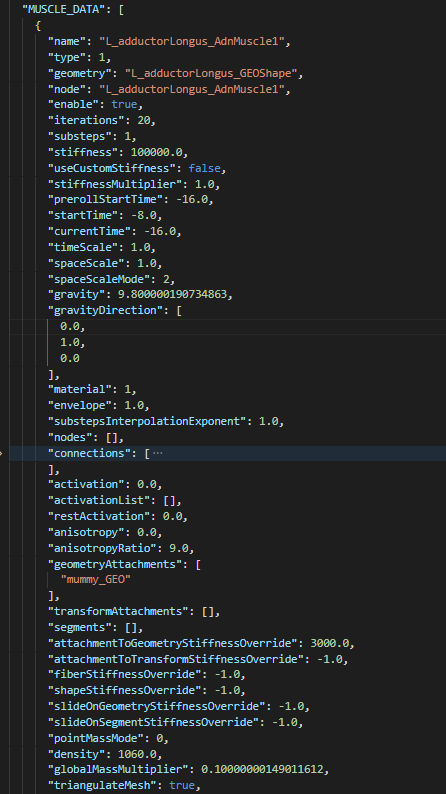
All other methods and data definitions can be found in:
Adonis/python/adn/api/adnx.py
Naming and Interoperability
When transferring data between DCCs, some naming conventions must be respected.
Deformed geometry uses the Shape suffix to describe the geometry entry. This is important when moving data between DCCs, because the geometry name must follow the expected naming convention.
Data such as geometryAttachments is represented using the name without the Shape suffix. This is also important for interoperability between DCCs.
If rig data is intended to be rebuilt in Houdini, the geometry names should match the equivalent Houdini deformable region names, such as those used in the ADN_IN_<geo_name> and ADN_OUT_<geo_name> Null nodes.
Limitations
- The use of Maya namespaces is not supported by the API.


